> ## Documentation Index
> Fetch the complete documentation index at: https://requestly-mintlify-changelog-requestly-past-week-38456.mintlify.site/llms.txt
> Use this file to discover all available pages before exploring further.
# Writing Tests
> Learn to write and execute API tests in Requestly using JavaScript, including validations like status code checks and JSON body tests.
***
Automated API testing ensures endpoints function as expected. Requestly allows you to write tests using JavaScript with the [`rq`](/general/api-client/scripts#requestly-javascript-api-rq) object enabling validations, schema checks, and automated workflows.
Common testing approaches include:
* **Contract Testing**: Validate responses against JSON schemas.
* **Unit Testing**: Test individual endpoints in isolation.
* **Error Handling**: Verify API behavior for invalid inputs.
You can execute tests using either [Pre-request scripts](/general/api-client/scripts#pre-request-scripts) (run before a request is sent) or [Post-response scripts](/general/api-client/scripts#post-response-scripts) (run after a response is received).
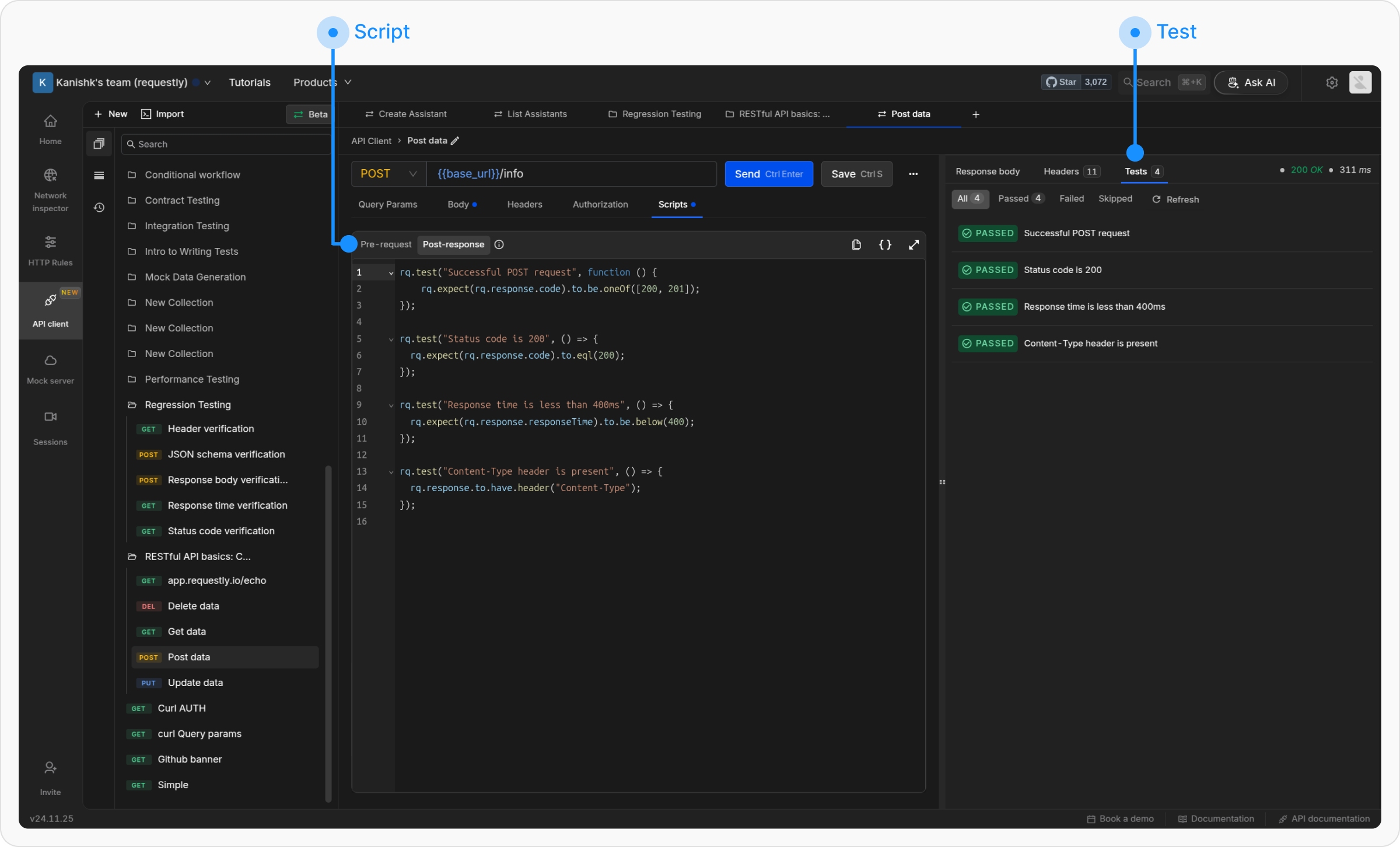 The Pre-request and Post-response tabs provide a scripting environment that allows dynamic behavior for API requests.
* The **Scripts → Pre-request tab** enables processing before sending a request, such as setting variable values or modifying headers.
* The **Scripts → Post-response tab** runs after receiving the response and allows for test assertions, logging, and response validation. This tab includes the [Chai.js library](https://www.chaijs.com/api/bdd/), supporting behavior-driven development (BDD) syntax for test assertions.
## Scripting Environment
Requestly provides a JavaScript runtime with built-in utilities. Here’s a quick reference table for key methods:
| **Method/Interface** | **Description** |
| --------------------------------------------------------------------------------------------------------------------- | -------------------------------------------------------------------------------------- |
| `rq.test` | Define a test with a name and callback for assertions. |
| `rq.expect` | Use [Chai.js BDD ](https://www.chaijs.com/api/bdd/)style assertions to compare values. |
| `rq.environment` | Access and manage environment variables. |
| `rq.globals` | Access and manage global variables. |
| `rq.response` | Access response details (status, body, headers, etc.). |
| [`rq.request`](/general/api-client/scripts#request-object-rqrequest) | Access request details (method, headers, body, URL, etc.). |
## Writing Tests
To create a test, use the following syntax:
Requestly tests use **Chai.js for assertions**. For more details and examples, visit the official ***Chai.js documentation***.
```javascript theme={null}
rq.test("Test name", () => {
rq.expect(actualValue).to.equal(expectedValue);
});
```
## Example Tests
### Status Code Check
```javascript theme={null}
rq.test("Status is 200", () => {
rq.response.to.have.status(200);
});
```
### JSON Body Validation
```javascript theme={null}
rq.test("User exists", () => {
rq.response.to.have.jsonBody("user.name", "John");
});
```
### Header Check
```javascript theme={null}
rq.test("Has auth header", () => {
rq.response.to.have.header("Authorization");
});
```
### Schema Validation
```javascript theme={null}
rq.test("Valid schema", () => {
rq.response.to.have.jsonSchema({
type: "object",
required: ["id"],
properties: { id: { type: "number" } }
});
});
```
### Skipping Tests
```javascript theme={null}
rq.test.skip("Temporarily disabled test", () => {
// This test won't run
});
```
## Response specific assertions
The `.to` API is supported only for response data in Post-response scripts.
**Status code assertions**
```javascript theme={null}
// Success responses
rq.response.to.be.ok // 2XX
rq.response.to.be.success // 200
rq.response.to.be.accepted // 202
// Client error responses
rq.response.to.be.badRequest // 400
rq.response.to.be.unauthorized // 401
rq.response.to.be.forbidden // 403
rq.response.to.be.notFound // 404
rq.response.to.be.rateLimited // 429
rq.response.to.be.clientError // 4XX
// Server error responses
rq.response.to.be.serverError // 5XX
// Other status categories
rq.response.to.be.error // 4XX or 5XX
rq.response.to.be.info // 1XX
rq.response.to.be.redirection // 3XX
```
`.to.have` **assertions**
```javascript theme={null}
// Checks if response body exactly matches expected value.
rq.response.to.have.body(expectedValue: string)
// Checks response status code or text.
rq.response.to.have.status(expectedValue: number | string)
rq.response.to.have.status(200);
rq.response.to.have.status("OK");
// Checks if response has specified header (case-insensitive)
rq.response.to.have.header(headerName: string)
// Validates that response body is valid JSON.
rq.response.to.have.jsonBody();
// Checks if a path exists in the response.
rq.response.to.have.jsonBody(path: string)
rq.response.to.have.jsonBody("user.name");
// Checks if a JSON path has a specific value.
rq.response.to.have.jsonBody(path: string, value: any)
rq.response.to.have.jsonBody("user.name", "John");
// Validates the response body against a JSON schema. Accepts optional Ajv configuration.
rq.response.to.have.jsonSchema(schema: object, ajvOptions?: AjvOptions)
rq.response.to.have.jsonSchema({
type: "object",
required: ["id", "name"],
properties: {
id: { type: "number" },
name: { type: "string" },
email: { type: "string", format: "email" }
}
}, { allErrors: true });
```
**Negation with** `.to.not`
All the above assertions can be negated by inserting `.not` after `.to`:
```javascript theme={null}
rq.response.to.not.be.error;
rq.response.to.not.have.header("X-Custom");
rq.response.to.not.have.jsonBody("error");
```
The Pre-request and Post-response tabs provide a scripting environment that allows dynamic behavior for API requests.
* The **Scripts → Pre-request tab** enables processing before sending a request, such as setting variable values or modifying headers.
* The **Scripts → Post-response tab** runs after receiving the response and allows for test assertions, logging, and response validation. This tab includes the [Chai.js library](https://www.chaijs.com/api/bdd/), supporting behavior-driven development (BDD) syntax for test assertions.
## Scripting Environment
Requestly provides a JavaScript runtime with built-in utilities. Here’s a quick reference table for key methods:
| **Method/Interface** | **Description** |
| --------------------------------------------------------------------------------------------------------------------- | -------------------------------------------------------------------------------------- |
| `rq.test` | Define a test with a name and callback for assertions. |
| `rq.expect` | Use [Chai.js BDD ](https://www.chaijs.com/api/bdd/)style assertions to compare values. |
| `rq.environment` | Access and manage environment variables. |
| `rq.globals` | Access and manage global variables. |
| `rq.response` | Access response details (status, body, headers, etc.). |
| [`rq.request`](/general/api-client/scripts#request-object-rqrequest) | Access request details (method, headers, body, URL, etc.). |
## Writing Tests
To create a test, use the following syntax:
Requestly tests use **Chai.js for assertions**. For more details and examples, visit the official ***Chai.js documentation***.
```javascript theme={null}
rq.test("Test name", () => {
rq.expect(actualValue).to.equal(expectedValue);
});
```
## Example Tests
### Status Code Check
```javascript theme={null}
rq.test("Status is 200", () => {
rq.response.to.have.status(200);
});
```
### JSON Body Validation
```javascript theme={null}
rq.test("User exists", () => {
rq.response.to.have.jsonBody("user.name", "John");
});
```
### Header Check
```javascript theme={null}
rq.test("Has auth header", () => {
rq.response.to.have.header("Authorization");
});
```
### Schema Validation
```javascript theme={null}
rq.test("Valid schema", () => {
rq.response.to.have.jsonSchema({
type: "object",
required: ["id"],
properties: { id: { type: "number" } }
});
});
```
### Skipping Tests
```javascript theme={null}
rq.test.skip("Temporarily disabled test", () => {
// This test won't run
});
```
## Response specific assertions
The `.to` API is supported only for response data in Post-response scripts.
**Status code assertions**
```javascript theme={null}
// Success responses
rq.response.to.be.ok // 2XX
rq.response.to.be.success // 200
rq.response.to.be.accepted // 202
// Client error responses
rq.response.to.be.badRequest // 400
rq.response.to.be.unauthorized // 401
rq.response.to.be.forbidden // 403
rq.response.to.be.notFound // 404
rq.response.to.be.rateLimited // 429
rq.response.to.be.clientError // 4XX
// Server error responses
rq.response.to.be.serverError // 5XX
// Other status categories
rq.response.to.be.error // 4XX or 5XX
rq.response.to.be.info // 1XX
rq.response.to.be.redirection // 3XX
```
`.to.have` **assertions**
```javascript theme={null}
// Checks if response body exactly matches expected value.
rq.response.to.have.body(expectedValue: string)
// Checks response status code or text.
rq.response.to.have.status(expectedValue: number | string)
rq.response.to.have.status(200);
rq.response.to.have.status("OK");
// Checks if response has specified header (case-insensitive)
rq.response.to.have.header(headerName: string)
// Validates that response body is valid JSON.
rq.response.to.have.jsonBody();
// Checks if a path exists in the response.
rq.response.to.have.jsonBody(path: string)
rq.response.to.have.jsonBody("user.name");
// Checks if a JSON path has a specific value.
rq.response.to.have.jsonBody(path: string, value: any)
rq.response.to.have.jsonBody("user.name", "John");
// Validates the response body against a JSON schema. Accepts optional Ajv configuration.
rq.response.to.have.jsonSchema(schema: object, ajvOptions?: AjvOptions)
rq.response.to.have.jsonSchema({
type: "object",
required: ["id", "name"],
properties: {
id: { type: "number" },
name: { type: "string" },
email: { type: "string", format: "email" }
}
}, { allErrors: true });
```
**Negation with** `.to.not`
All the above assertions can be negated by inserting `.not` after `.to`:
```javascript theme={null}
rq.response.to.not.be.error;
rq.response.to.not.have.header("X-Custom");
rq.response.to.not.have.jsonBody("error");
```